
using pss-core article to embed a youtube video in the body of the page
Switch to HTML view and insert this code - note the bits in bold you need to put in - not in bold obviously.
- The height and width are important to ernsure it works on all size devices.
- The alt text is so people using adaptive devices like screen readers are told what the object on the page is.
- Needs the YouTube link as generated by their official embed code (under "Share"), not the general url of the video
- (The Youtube embed code is pretty good you need to edit it to add the sizing and alt text though)
<p>
<iframe allow="accelerometer; autoplay; encrypted-media; gyroscope; picture-in-picture" allowfullscreen="" frameborder="0" height="200" src="YouTube embed link" width="330" title="some alt text"></iframe>
</p>
have a look at the HTML behind this example
using PSS article to embed a clickable image and link underneath:
Code for embedding a clickable image and link underneath:
<p>
<a href="url to link to" target="_blank">
<img src="url of image file" alt="" style="width: 330px; height: 164px;" class="">
<br>Text you want included in the link
</a>
<br>Text which is outside the link in the next line
</p>
Example below
<p><a href="https://online.manchester.ac.uk/bbcswebdav/xid-44798169_1" target="_blank"> <span id="media-798595-0.468377914134427" class="mceNonEditable"><img style="width: 330px; height: 186px;" src="https://sitemanager.manchester.ac.uk/terminalfour/SiteManager?ctfn=download&fnno=60&ceid=951272516" alt="Image of network bingo card" /></span> <br />See who you can find </a> <br />(Click for a larger image - prefer a text version? ‌<span id="media-798888-0.8037999653688198" class="mceNonEditable"><a href="https://sitemanager.manchester.ac.uk/terminalfour/SiteManager?ctfn=download&fnno=60&ceid=1451752030">6 degrees challenge text version</a></span></p>
If you want to link to an image in the Media Library, you need the Site Manager generated link first
(eg. https://sitemanager.manchester.ac.uk/terminalfour/SiteManager?ctfn=download&fnno=20&sid=null&cid=798593&elem=media&lang=en ) -
T4 then generates the proper link (as shown in the example) once it publishes.
Adding this final link in T4 creates a space but no image.<br />No alt text is needed as the link is really just eye candy - you just need the link.<br />Need to give it the actual size of the image
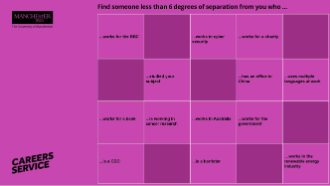
See who you can find
(Click for a larger image - prefer a text version?


